AI cat dance: how to get your cat dancing (even the one who hides from cameras)
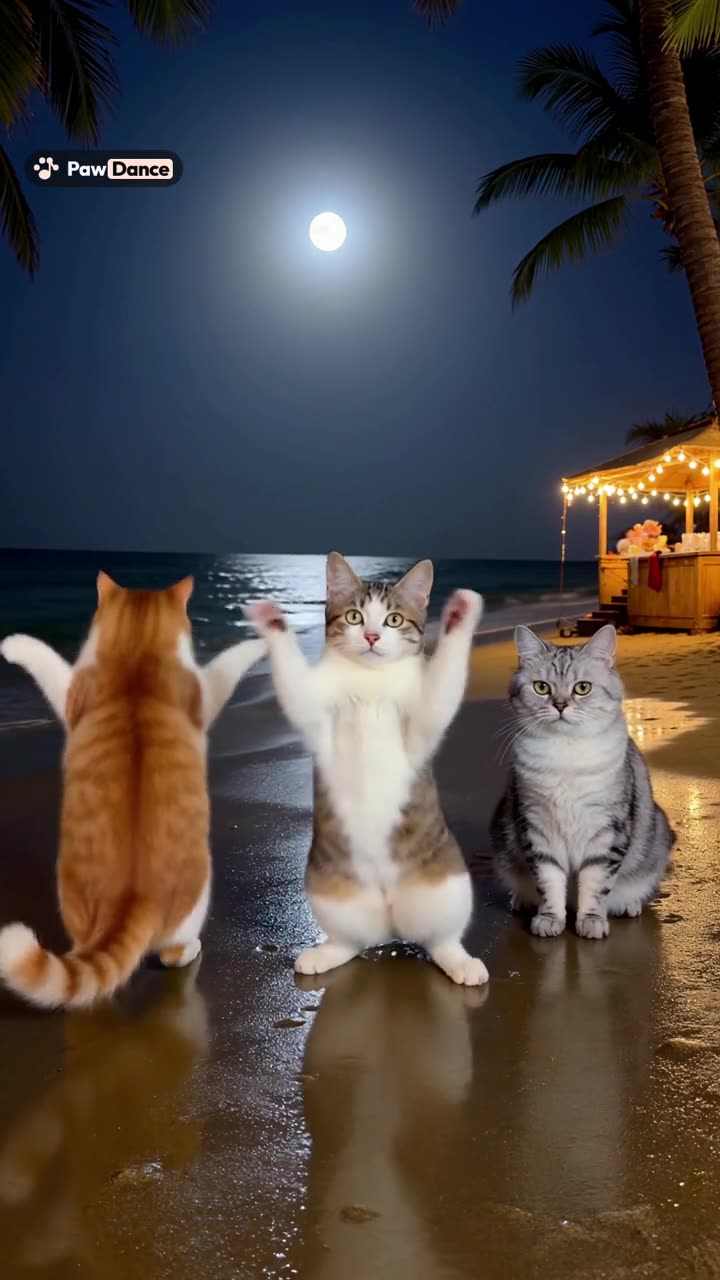
To make an AI cat dance video, you need one sharp, full-body photo of your cat standing or sitting up with its legs visible, a dance (a template or a clip of someone dancing), and an AI video generator that copies the moves onto your cat. On PawDance it takes about 5 to 10 minutes and keeps the music.
The dancing part is easy, since the AI does all of it and your cat never has to agree to anything, which suits most cats. The hard part is the photo. Dogs will stand still for a treat. Cats will stand still for about half a second, usually facing the wrong way. If you want to make your cat dance with AI, most of the work is getting one usable photo. This guide covers how to get it, how to choose a dance that looks good on a cat, and how to fix the problems specific to fur, stripes and tucked-in paws.
How AI cat dancing works
An AI cat dancing video is made by motion transfer. You give the video model a reference dance, usually a person or a group dancing, and a photo of each cat. The model draws your cat performing those moves, frame by frame, in the dancer’s place. Nothing about it needs your cat to move, hear music, or be awake.
That also means the model can only work with what is in the photo. Whatever it cannot see, such as a paw tucked under the chest, it has to guess.
Step 1: Get one good photo of your cat
What the AI needs:
- One cat per photo. For a group dance, take a separate photo of each cat.
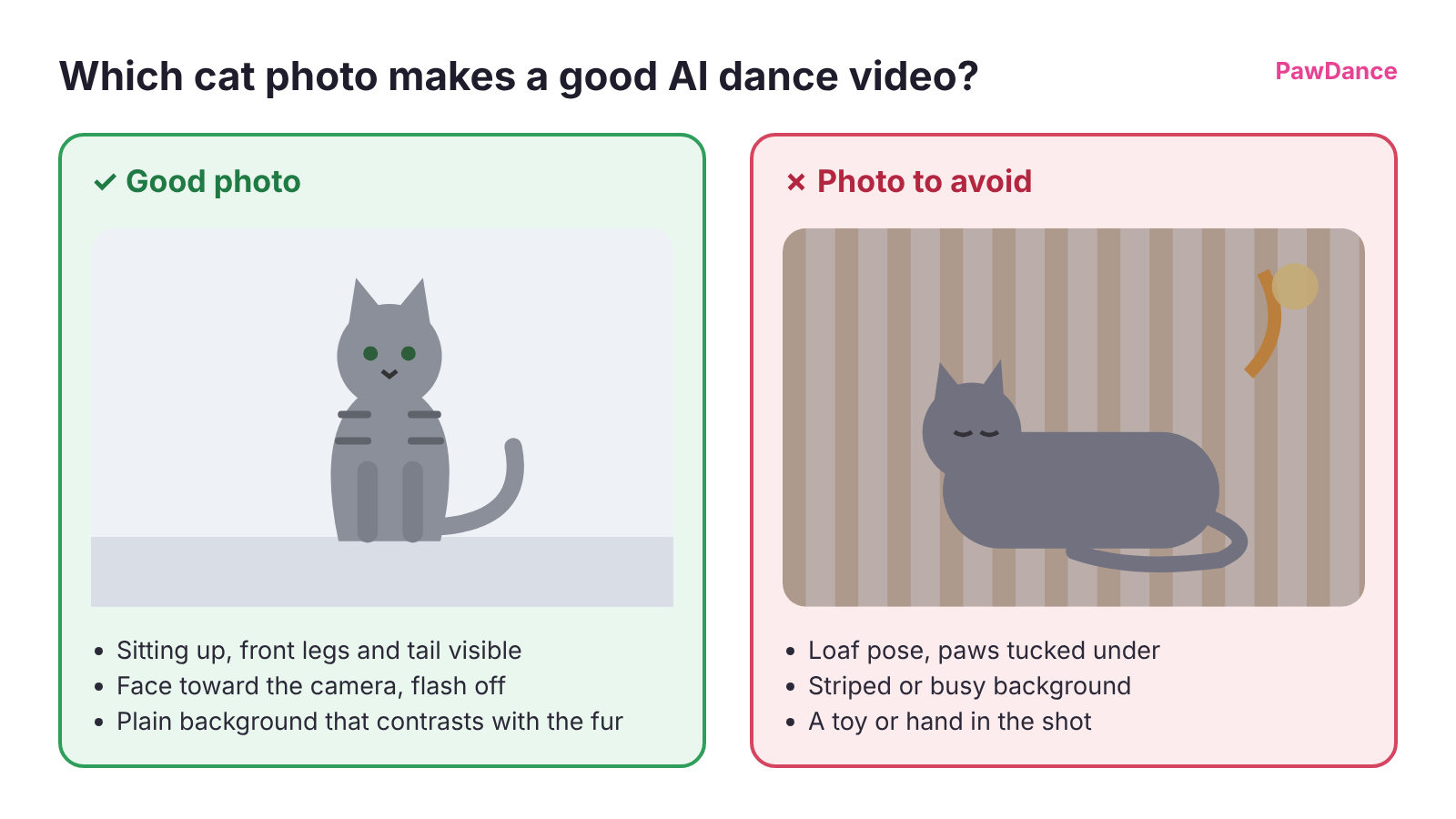
- The whole body in frame, ears to tail, with the legs visible.
- A front or side view. A cat sitting up or standing gives the model legs to work with. A loaf with all four paws tucked away does not.
- Soft, even light. Daylight from a window works well.
- No people in the shot, including the hand holding the toy.
- A plain background. For a long-haired cat, a background that contrasts with the fur makes the outline easier to read.
How to get it from a cat who would rather leave:
- Time it. The UK charity Cats Protection suggests shooting just after your cat has eaten or woken up, when it is more likely to be relaxed.
- Turn the flash off. The same guide says a flash could startle your cat, and a startled cat is a blurry cat.
- Get a helper to wiggle a toy just out of frame. A cat watching a toy sits up, looks forward and shows its front legs, which is the pose you want.
- Use burst mode, take twenty shots, and keep the one where all the legs are showing.
If you use a feather or string toy to get the pose, put it away when you are done. The Cornell Feline Health Center warns that strand-like parts such as feathers and string can come apart and be swallowed.
If you plan to make more than one video, save 3 to 5 photos of the same cat as a pet profile on PawDance’s My Pets page. More angles help the model keep your cat’s markings and face consistent from one video to the next.
Step 2: Pick a dance that looks good on a cat
Cats look most convincing in dances where most of the action is in the head, shoulders and front paws: head flicks, paw points, sways and small bounces. Fast footwork and floor work are hard for any pet, and on a fluffy cat the model has even less leg outline to work from.
Two PawDance templates use cats in their example videos:
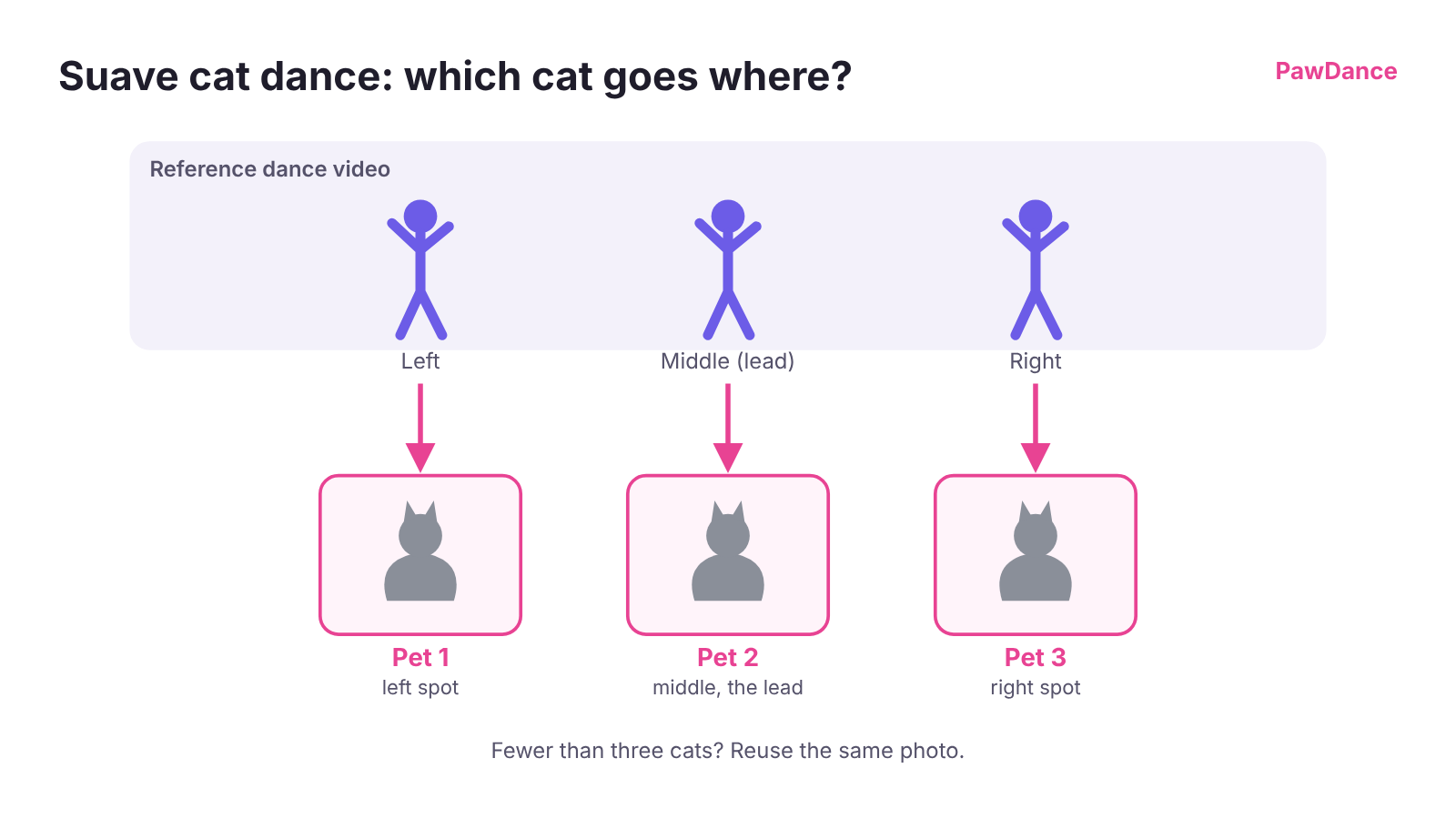
- The Suave cat dance is the three-kitten trend: one cat leads, one dances with its back turned, and one barely moves. It runs 24 seconds on a moonlit beach. If you have a cat who refuses to commit to anything, it already has a part. You can reuse the same photo if you have fewer than three cats.
- The NEON two-cat dance is the one to use for two cats dancing together, with a head flick, a paw point, a spin and a high-low pose.
Both work with dogs too, and you can mix cats and dogs in one video.
Which cat goes where
Each pet replaces one dancer, counting from the left. In the Suave cat dance, pet 1 takes the left spot, pet 2 the middle spot as the lead, and pet 3 the right. Give the lead to the cat with the sharpest photo, since that is the spot people watch.
Using your own dance clip
You can also upload any dance you have the rights to on the use your own dance video page: an MP4 or MOV from 3 to 30 seconds, up to 10 MB, with 1 to 4 dancers. For a clean cat dance AI result, pick a clip with a steady camera and no cuts or zooms, full bodies in frame the whole time, dancers who stay in their spots, and big, clear moves. Trim it to the best part first; shorter dances cost less.
Step 3: Generate and check your AI cat dance video
Add one photo per dancer, press Generate, and wait about 5 to 10 minutes. The finished AI cat video is 720p HD, with the original sound and length of the dance.
Watch it through once before you share it. Check the legs during the busiest part of the dance, the stripes or patches on the back, and the eyes. Every account gets one free redo of a finished video within a day of making it, and a video that fails to generate is returned to your account automatically.
Fixing the problems cats tend to have
| What you see | Likely cause | What to try |
|---|---|---|
| Extra legs, or legs that appear from nowhere | Paws tucked under the body in the photo | A photo of your cat sitting up or standing with the front legs visible |
| Fur looks smeared or the outline goes soft | A long-haired cat against a busy or similar-colored background | Retake the photo against a plain background that contrasts with the fur |
| Stripes or patches shift during the video | One photo in dim or mixed light | A daylight photo, or a pet profile with 3 to 5 photos |
| The face looks like a different cat | Face turned away, small or blurry | A sharp photo with the face toward the camera, taken with the flash off |
| The cats are in the wrong spots | Photos added in the wrong order | Pet 1 always takes the leftmost dancer |
| A hand or toy appears in the video | It was in the photo | Crop it out or retake the photo |
If a redo with the same photo gives the same problem, change the photo. The model is guessing at whatever the picture does not show.
Posting your dancing cat video
Before you post, check two things.
Music and video rights. Only upload dance clips you made or have permission to use. The original creator still owns the clip and its music, so on TikTok or Reels it usually works best to add the trend’s sound from the app’s own library.
The AI label. Every PawDance file is marked as AI-generated. TikTok’s policy also requires creators to label AI-generated content that contains realistic images, audio or video, and it has a label you can turn on when you post. Your cat’s reputation for refusing to perform stays intact.
Is there a free AI cat dance generator?
PawDance has no free trial. Your first video is $4.99 (once per account), then $9.99 per video, with lower prices in packs of 3 or 5. One video covers one dance up to 30 seconds.
General AI video tools such as Kling, Kapwing and Hailuo can also turn a cat photo into a dancing clip, and some give limited free credits under terms that change often, so check their current pricing. With those you usually supply and trim the reference clip, write a prompt, and edit the result yourself. PawDance is set up for pets: you add photos, pick a dance and press Generate.
Frequently asked questions
How can I make an AI video of my cat dancing?
Take a clear photo of your cat sitting up or standing with its legs visible, pick a dance template or upload a dance clip, and let an AI video generator copy the moves onto your cat. On PawDance it takes about 5 to 10 minutes.
How do people make those AI cat videos?
Many of the dancing cat videos on TikTok and Reels use motion transfer: a video model takes a clip of a person dancing and redraws a cat in their place, using one photo of the cat.
Is there a free AI cat dance generator?
Some general AI video tools offer limited free credits that change often. PawDance has no free trial, but the first video is $4.99 and failed videos are refunded to your account automatically.
Can my cat and my dog dance together?
Yes. You can mix cats and dogs in the same video, up to 4 pets, one per dancer. Pet 1 takes the leftmost dancer's place.
What if every photo of my cat is of it lying down?
A lying-down photo hides the legs, so the AI has to invent them, and that is where extra or melting legs come from. Wait until your cat is sitting up watching something, or have a helper hold a toy just out of frame, and take a few shots in burst mode.
Does my cat need to hear the music or do anything?
No. The AI makes the whole video from the photo. Your cat can sleep through its own debut.
More guides
Or go straight to the AI dog dance and cat dance generator and pick a dance.